
VIPTools / Document workflow
DocuGrid
Extract document fields into a grid with AI assistance.
Define columns, run extraction, inspect source evidence and review results before downloading CSV.
Open DocuGridSign-in and tool access are required. This page is a preview, not the editor.
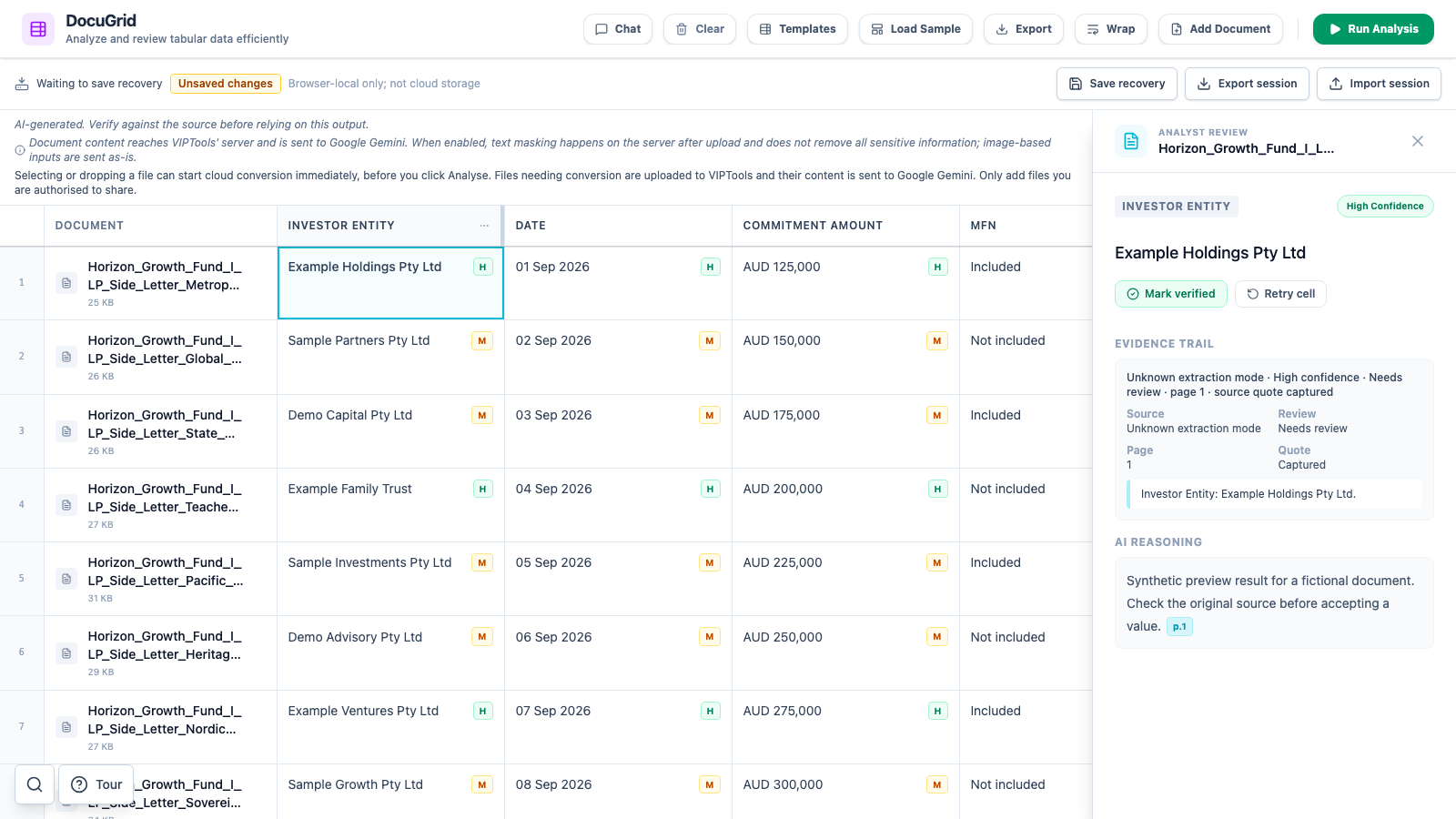
From source to output
Load documents and columns
Add supported documents and define the fields you need. Start from a template or write column instructions.
Run AI extraction
Run analysis to populate the grid. Inspect source quotes, confidence and extraction evidence in the review panel.
Review and export
Correct values, mark checked results as verified and download CSV. Save a session file to resume your review.
Privacy and processing
DocuGrid is AI-assisted, not browser-only. Document content and instructions needed for conversion, extraction and AI chat are sent through the authenticated VIPTools backend to OpenAI, a third-party AI provider. Adding files that need conversion can start this upload before you run analysis. Follow your organisation's document-handling policy. Local recovery and session files can also contain source content and results.
What to check
AI output and confidence scores can be wrong. Check results against the original documents before use. Supported uploads have file-size and document-count limits. AI access, service availability and usage limits can restrict analysis. A verified marker records your review; it is not independent certification.